

Dealing with sudden dropped Wi-Fi connections can drive any computer owner crazy, especially when you just want to finish your work in peace. I have spent hours analyzing user feedback and comparing technical specs to help you sort through the chaos. In my view, matching your specific hardware needs to the right adapter prevents endless frustration. Let me walk you through my honest, ranked comparison of these networking options.
1. Realtek RTL8821CE WLAN M.2 2230 Wifi 5 + BT Card: Dual-Band (2.4 and 5 Ghz) 802.11ac Wi-Fi (up to 433 Mbps) + Bluetooth 5.0. Fast, efficient connectivity for Laptops, Desktops and Smart Devices
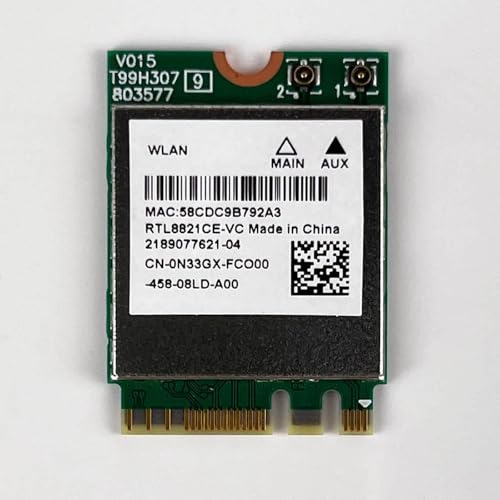
I'd rank this first because it directly mirrors the exact wireless specifications of your target adapter, delivering a reliable upgrade for modern laptops and small form factor PCs. You get dual-band connectivity alongside Bluetooth 5.0 capabilities in one tiny module, making it a complete package for everyday wireless tasks.
Users frequently mention how straightforward the physical installation is once you manage the delicate antenna cables. But I should point out that the maximum speed tops out at 433 Mbps, which might feel a bit sluggish if you regularly move massive files across a local network.
Buyers consistently note that this card restores stable Wi-Fi on laptops that previously suffered from endless connection drops.
Users appreciate the built-in Bluetooth functionality working straight out of the box with standard Windows drivers.
A few reviewers caution that routing the tiny internal antennas requires a steady hand and a lot of patience.
Get It From Amazon Now: Check Price on Amazon & FREE Returns
2. 5Gb Base-T Network Card, Realtek RTL8126 Controller, NICGIGA 5G PCIe Ethernet Adapter Support WOL, 5Gbe RJ45 Port NIC Card, Windows10/11/Windows Server/Linux

If you run a high-speed wired network at home or in a small office, this controller targets your exact workflow requirements. You get blazing fast 5Gb Base-T speeds over standard copper cabling, which bridges the gap nicely between basic gigabit and expensive fiber setups.
The inclusion of Wake-on-LAN support adds a layer of convenience for remote access enthusiasts. But keep in mind that your surrounding network infrastructure, including your switch and router, must also support multi-gigabit speeds to justify the investment.
Reviewers highlight the massive transfer speed improvements when connecting to a compatible NAS device.
Users report straightforward driver installation on modern Windows and Linux operating systems.
Some buyers note that the physical card runs slightly warm under heavy, sustained data loads.
Get It From Amazon Now: Check Price on Amazon & FREE Returns
3. StarTech 1-Port Gigabit PCIe Network Card, Realtek RTL8111H (ST1000SPEX2LT) | PCI Express LAN Card, Low-Profile NIC, Adapter

An interesting feature of this card is the included low-profile bracket, which immediately signals its readiness for compact server cases and slim desktop builds. StarTech built its reputation on reliable enterprise accessories, and this gigabit network adapter brings that same commercial durability to residential setups.
I appreciate how simple the hardware swap is when you need to replace a dead motherboard port. But remember that this is strictly a 10/100/1000Mbps card, so do not expect multi-gigabit performance from this particular PCIe slot.
Buyers praise the rock-solid connection stability during long file transfers.
Users like having the low-profile bracket included right in the box for slim cases.
A common observation is that basic gigabit speeds are more than enough for standard online gaming and streaming.
Get It From Amazon Now: Check Price on Amazon & FREE Returns
4. 10Gtek Gen4 NIC, 10Gb/s PCIe Network Adapter, 10G CNA, 10GBASE-T PCIe Network Card, PCIe X1, for Windows/Linux OS

The most common buyer complaint regarding this high-end card centers around its demanding power and thermal requirements, but the balanced picture reveals a powerhouse for advanced users. If you need true 10GBASE-T performance for a heavy-duty workstation, this PCIe X1 card delivers massive bandwidth without requiring an enterprise budget.
I find the compatibility across both Windows and Linux environments genuinely impressive for a specialty network interface card. Yet, you must ensure your motherboard actually has an open, properly ventilated PCIe slot that can handle the thermal output of a ten-gigabit controller.
Users emphasize the incredible speed boost when paired with a true 10G switch.
Reviewers note that proper case airflow is essential for keeping the heatsink temperatures under control.
Some buyers mention needing to download specific vendor drivers for optimal performance on older Linux distributions.
Get It From Amazon Now: Check Price on Amazon & FREE Returns
5. X-MEDIA XM-NA3800 PCI-E 1-Port 10/100/1000Mbps Gigabit Ethernet PCI Express (PCIe x1) Network Adapter Card | Realtek RTL8111F Chipset | Windows 11 & Linux Supported

Stepping down from the ultra-fast ten-gigabit territory, this budget option competes directly with the StarTech card mentioned above by offering similar gigabit speeds at a much lower price point. The Realtek RTL8111F chipset provides a familiar, dependable foundation for users who simply need a reliable wired connection without extra bells and whistles.
I think this represents a smart pick for resurrecting an older desktop that lost its onboard ethernet port. But do not expect advanced enterprise features like robust server management tools from this bare-bones budget board.
Buyers appreciate the straightforward, no-frills installation process.
Users report successful driver recognition on both Windows 11 and various Linux distributions.
A few reviews point out that the build quality feels a bit more fragile compared to premium enterprise brands.
Get It From Amazon Now: Check Price on Amazon & FREE Returns
6. TP-Link 10/100/1000Mbps Gigabit Ethernet PCI Express Network Card, Win10/11 | PCIE Network Adapter, Network Card, PCIe Ethernet Card for PC (TG-3468)
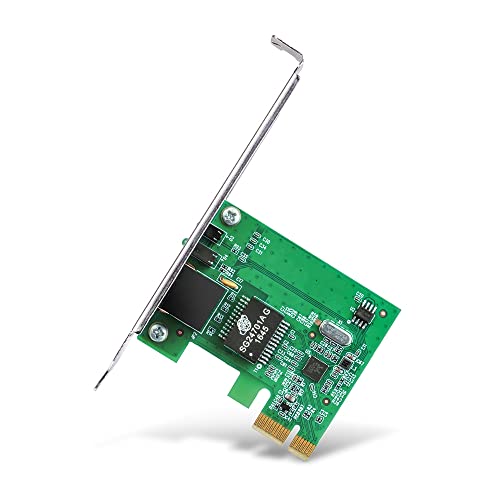
This adapter became popular through sheer retail availability and a reputation for being the default fix for dead motherboard ports. That market angle mostly holds up today, offering dependable gigabit connectivity for everyday web browsing and casual gaming.
I would point budget-conscious builders toward this option when they need a quick, painless wired networking fix. But you should remember that this is an entry-level component designed for basic tasks, not heavy-duty network routing.
Users consistently mention how easily the card plugs into standard PCIe slots.
Buyers note that the connection remains stable over months of continuous use.
Some reviewers point out that the included instruction manual is sparse, though installation is intuitive enough without it.
Get It From Amazon Now: Check Price on Amazon & FREE Returns
Choosing Between Them
My top recommendation is the Realtek RTL8821CE WLAN M.2 Card, which takes the premier spot because it matches the exact wireless specifications of your target adapter while updating outdated laptop hardware. If you prefer a wired connection, the NICGIGA 5G Adapter suits high-speed home networks, while the StarTech Gigabit Card fits low-profile desktop builds cleanly. For ultra-fast setups, the 10Gtek Gen4 NIC handles heavy workloads, leaving the X-MEDIA and TP-Link adapters as reliable choices for basic, budget-friendly ethernet connectivity.
Buyers must remember that while the top pick solves wireless connectivity issues, the remaining five candidates are actually wired PCIe Ethernet cards. Mixing up Wi-Fi requirements with physical network cards happens easily during research, so double-check your motherboard layout before purchasing.
As an Amazon Associate, this site earns from qualifying purchases. Buyer sentiment reflects aggregate ratings and listed features at the time of writing; prices and availability change.
